
Can You Fly a Drone in Cold Weather?
Bywpdev
Cold-Weather Flight Decision
Can you fly a drone in cold weather? Sometimes—but only when the aircraft and battery are operating inside their verified temperature limits and the pilot keeps a larger power reserve than on a mild day. Cold can reduce the battery’s available power, shorten useful flight time, trigger earlier voltage warnings, and make return-to-home less forgiving. Keep the battery at a suitable temperature before takeoff, perform a short low-altitude check, remain close, return early, and do not charge the pack until it has warmed and dried according to the manufacturer’s instructions.
- Confirm the model-specific operating and charging temperature limits.
- Keep the flight battery protected from cold until setup is complete.
- Use a short hover and close out-and-back check before extending the route.
- Land early if the battery falls quickly, voltage warnings appear, or control margin changes.
- Allow the powered-off drone and battery to warm gradually before powering the aircraft, charging the battery, or storing the equipment.
Cold-weather drone flying is not simply normal flying with warmer clothes. The battery, remote controller, phone or screen display, propellers, camera, and aircraft electronics all begin the flight at a different thermal condition. A drone may launch normally and still have less usable power available for climbing, holding position, fighting wind, and returning to the home point.
The air temperature shown by a weather app is only one part of the decision. Battery temperature, wind, moisture, snow, previous storage conditions, battery age, route length, and the time the drone spends sitting outside before takeoff can matter just as much.
This guide follows the real sequence a beginner needs: prepare the battery indoors, protect it during travel, verify the aircraft at the launch point, shorten the route, recognize warning signs, and manage condensation after landing. Wind remains a separate decision; use the dedicated beginner drone wind guide when gusts or a difficult return direction are part of the forecast.
Can You Fly a Drone in Cold Weather? Start With the Battery, Not the Forecast Number
The correct question is not “Is this temperature cold?” It is: “Are the aircraft, battery, and controller within the model’s verified operating limits, and does the planned route preserve enough battery and landing reserve?” Consumer drones use different battery packs, battery-management systems, motors, firmware, and warning logic. A temperature that one manufacturer permits may sit outside another model’s approved range.
Do not borrow an operating limit from a different drone, even when both aircraft are similar in weight or use the same nominal battery voltage. A 7.4V label does not tell you the cell chemistry, internal resistance, discharge capability, thermal protection, or firmware behavior under load.
| Cold-Weather Question | Evidence to Use | Evidence Not to Substitute |
|---|---|---|
| Can this model operate at the current temperature? | Current manual or supplier-confirmed operating range | A temperature limit published for another drone |
| Can the battery be charged now? | Battery-specific charging range and battery temperature | Room temperature measured elsewhere in the building |
| How long will it fly? | Observed battery trend with a large reserve | The listed flight time from mild test conditions |
| Can return-to-home complete the route? | Current distance, wind, altitude, battery trend, and model behavior | The presence of a GPS or RTH button alone |
| Is the aircraft ready after coming indoors? | Gradual warmup, dry surfaces, and manufacturer guidance | A battery percentage that appears to recover after landing |
Decision boundary: RCDronego has not provided a verified minimum operating temperature, minimum charging temperature, or cold-weather flight-time result for the models discussed on the site. Those limits remain Model-Specific / Supplier Confirmation Required.
Cold Air Reduces the Drone Battery’s Available Power and Flight-Time Margin
Lithium-based batteries can deliver less usable power and energy when cold. The chemical and electrical processes inside the pack become less favorable, internal resistance can increase, and voltage may fall more sharply when the motors demand power. The FAA has specifically warned drone pilots that cold air can affect drone batteries. This supports a general cold-weather caution, but it does not establish an operating limit for any RCDronego model.
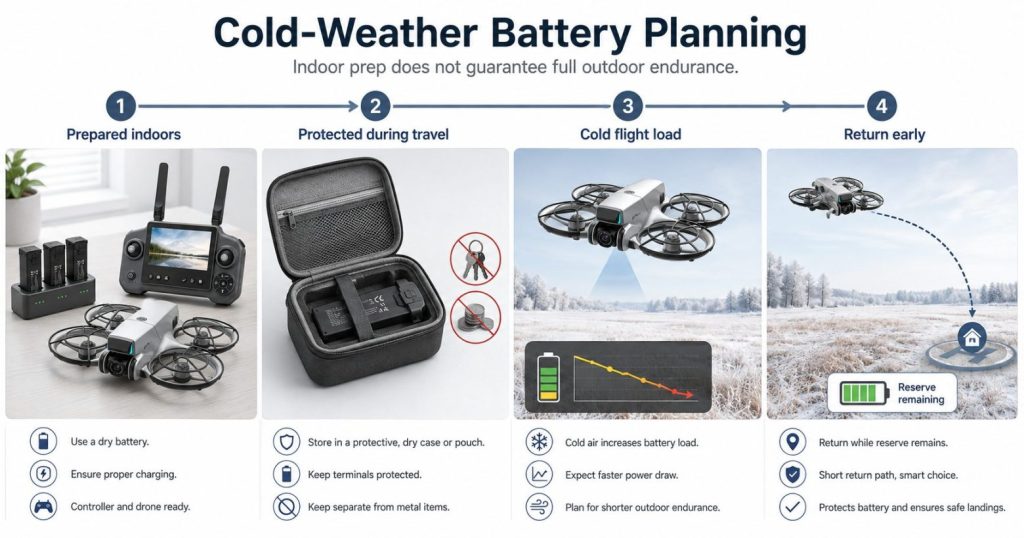
This does not mean every cold battery will fail at takeoff. It means the pilot has less room for a long climb, repeated acceleration, a headwind return, or waiting until the normal low-battery warning. The pack may show a reasonable percentage at rest and then experience a larger voltage drop once all motors are loaded.
Battery Percentage Is an Estimate, Not a Guaranteed Number of Minutes
The percentage on a screen is calculated from battery measurements and software assumptions. It is not a direct fuel gauge. In cold conditions, the relationship between displayed percentage, voltage under load, and remaining usable power can change. A percentage that falls faster than expected is more important than the original number shown at takeoff.
The reading may also rise slightly after landing or after motor load is removed. That apparent recovery does not return the energy already used, and it should not be treated as proof that the flight could have continued safely.
Listed Flight Time Does Not Become a Cold-Weather Promise
RCDronego lists approximately 25 minutes for models such as XT606 and GT6 and approximately 22 minutes for AE20 Max based on supplied product specifications. Those figures are not cold-weather guarantees. Temperature, wind, climbing, camera use, battery age, payload, route, and pilot behavior can all reduce actual performance.
A beginner should not convert a listed 25-minute value into a plan to fly for 20 minutes and return during the final five. The aircraft must still have power for navigation, corrections, descent, landing, and an alternate landing option if the home point becomes unsuitable.
The Remote Controller and Screen Can Also Lose Endurance
Cold affects more than the flight battery. A built-in screen remote, phone, or controller battery may provide less practical endurance in cold conditions. Begin with the controller fully charged, keep it protected before use, and follow the device’s stated operating-temperature range.
For a concise official warning aimed at drone pilots, see the FAA’s cold-weather drone safety guidance. It supports the general battery-performance boundary; it does not provide the operating limit for an RCDronego model.
Prepare the GPS Drone Battery Indoors Before a Cold-Weather Flight
Cold-weather preparation should begin before the drone reaches the launch site. The goal is not to make the battery hot. The goal is to keep it within the manufacturer’s permitted range and avoid letting it become cold-soaked while the pilot chooses a location, connects the controller, or waits for GPS.
Charge Only Within the Battery’s Confirmed Charging Range
Do not charge a battery immediately after it has been stored or used in the cold unless the manufacturer explicitly permits charging at that temperature. Charging limits vary by battery chemistry, cell design, charger logic, and temperature sensing, so use only the battery-specific charging range in the current manual or supplier documentation.
Allow the battery to reach an appropriate, stable temperature naturally. Keep it away from direct flame, hot water, heating vents, radiators, hair dryers, and improvised high-temperature heaters. Fast, uneven heating can create a different safety problem and may warm only the outside of the pack.
Inspect the Drone Battery Before Warming or Installing It
- Do not use a pack that is swollen, punctured, crushed, leaking, corroded, or unusually soft.
- Check the connector and battery compartment for moisture, dirt, ice, or damaged contacts.
- Confirm the battery locks securely into the aircraft.
- Use the correct charger and approved battery type for the model.
- Separate spare batteries from keys, coins, tools, and other conductive objects.
- Do not use a battery that shows an unexplained warning, smell, heat change, or charging fault.
A cold-weather flight is not the time to evaluate a battery of uncertain age or condition. Increased internal resistance from normal aging can combine with cold conditions and motor load to reduce the available margin further.
Protect the Battery During Travel to the Launch Site
Carry the battery in a dry protective case or manufacturer-approved insulated battery pouch with the terminals protected. Keep it separated from keys, coins, tools, and other conductive objects, and protect it from impact and moisture during transport.
Do not leave the battery in a cold vehicle, on frozen ground, or installed in the drone while completing a long setup. Insert it near the end of the preparation sequence, after the launch area, controller, propellers, route, and weather have already been checked.
Do not “warm” a battery by running the motors indoors, covering the aircraft while powered, or placing the pack against a high-heat source. Use only the preparation method permitted by the battery and aircraft manufacturer.
Use a Short Low-Altitude Check Before Extending the Cold-Weather Route
A battery that felt suitable indoors begins cooling as soon as it is exposed. A short check close to the home point cannot certify the aircraft for all cold conditions, but it can reveal an unsuitable battery trend before the drone is sent higher, farther, or over terrain with poor landing options.
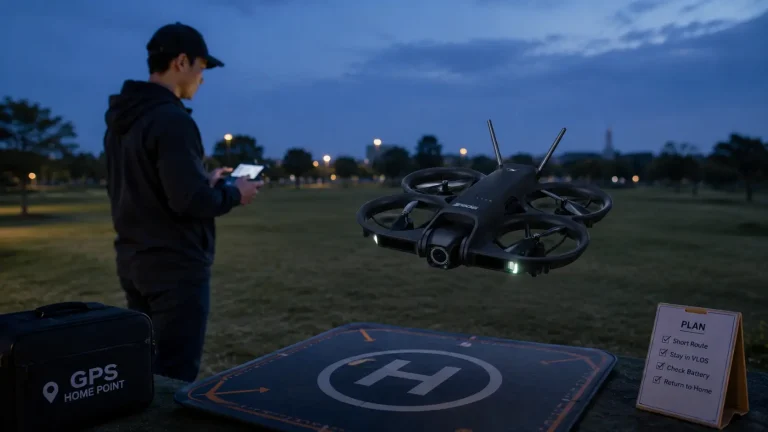
- Choose a clear launch area. Avoid snowbanks, wet grass, ice, water, people, vehicles, wires, and overhanging branches.
- Inspect propellers and motors. Remove moisture, frost, snow, and debris before power-up.
- Install the protected battery last. Confirm that the latch and connector are fully engaged.
- Power the controller and aircraft normally. Watch for abnormal battery, temperature, motor, or sensor messages.
- Confirm GPS and the home point. Cold weather does not make an inaccurate or missing home point acceptable.
- Lift only to a low, clear hover. Observe position hold, motor sound, battery percentage, and warning behavior.
- Make a short movement away and back. Verify deliberate control response and enough power for the return direction.
- Land if the battery trend changes rapidly. Do not continue merely because the aircraft remains airborne.
Do Not Use a Long Warmup Hover
A brief hover can reveal obvious problems, but hovering for an extended period consumes the same battery needed for the route and landing. The objective is to obtain enough information to make a decision, not to heat the battery by spending a large part of its charge close to the ground.
Keep the First Cold-Weather Route Close and Reversible
The route should remain close enough that the pilot can return and land without depending on the final battery warning. Avoid starting with a distant subject, a high climb, a long automated path, or a flight over water. A short route provides more opportunities to notice an abnormal power trend and more nearby landing choices.
Cold can shorten both practical flight time and useful distance. The GPS drone range guide explains why listed control and transmission distances are not the same as a safe battery-supported route.
Low-altitude check boundary: Passing this check confirms only the behavior observed at the current location, battery state, height, and moment. It does not prove the aircraft can complete a longer route or operate at an unverified minimum temperature.
Return Earlier When Cold Weather Changes the Drone Battery Trend
A beginner should not wait for a precise percentage threshold that has not been verified for the model and route. The more useful signal is the battery trend: how quickly the displayed level changes, whether warnings appear earlier than expected, whether the aircraft can still climb and return normally, and how much power remains for landing.
| Cold-Flight Observation | What It May Indicate | Beginner Response |
|---|---|---|
| Battery percentage falls much faster than during a mild-weather flight | Reduced usable energy or increased load | Shorten the route and land early |
| Battery or low-voltage warning appears soon after takeoff | The pack may not support the planned load safely | Return and land without continuing the test |
| The drone climbs or accelerates less confidently | Available power margin may be reduced | Stop climbing, remain close, and land |
| Return speed slows while the battery continues to fall | Cold, wind, or both may be consuming the reserve | Use the safest nearby landing option before the battery becomes critical |
| The battery reading rebounds after reducing throttle or landing | Voltage may have recovered after load was removed | Do not relaunch based only on the recovered number |
| The controller or screen battery falls unexpectedly | The ground equipment is also affected by cold | End the session before control or display power becomes uncertain |
On Supported Models, Low-Battery Return-to-Home Is a Backstop
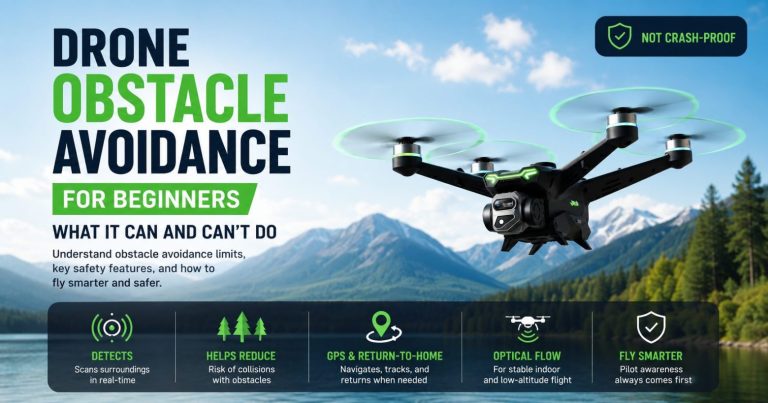
On compatible models, return-to-home can command a route toward the recorded home point, but it cannot restore battery power. The aircraft may climb to a preset altitude, fight a headwind, or spend additional energy correcting its route. Cold weather can reduce the practical battery reserve available before or during an automated return.
Confirm the home point and return altitude before takeoff, and begin the return while the aircraft still has a comfortable reserve. The GPS return-to-home guide explains manual, low-battery, and signal-loss return behavior in more detail.
Choose the Nearest Safe Landing Area Before the Battery Becomes Critical
The home point is not automatically the safest landing location. A person, animal, vehicle, snowplow, puddle, or patch of ice may have entered the area after takeoff. If battery behavior changes sharply, prioritize a clear reachable landing area rather than forcing a long return to an obstructed point.
Do Not Relaunch Immediately After an Abnormal Cold-Battery Warning
A pack that recovers some displayed percentage after landing has not been cleared for another flight. Power the aircraft down, inspect the battery, move it to a safe dry location, and follow the manufacturer’s instructions. Repeated warning behavior requires supplier or service confirmation rather than another airborne experiment.
Land immediately when practical if the aircraft reports a battery, voltage, motor-power, or temperature warning that you do not understand. Do not dismiss the warning because the live video still looks normal.
Cold Weather, Wind, Snow, and Moisture Create Different Drone Risks
Temperature should never be evaluated alone. A dry, calm, model-approved cold day is different from the same temperature with gusts, falling snow, fog, freezing moisture, or a launch surface covered with wet slush.
Cold Plus Wind Reduces the Return Margin Twice
Cold can reduce available battery performance while wind increases the power needed to hold position and return. A route that feels comfortable in calm cold air may become unsuitable when the aircraft must fly home against a headwind. Treat the combination as a new decision, not as two separate minor issues.
Do Not Fly in Snow or Rain Unless the Exact Model Documentation Permits It
Do not assume that cold weather makes snow harmless. Snow can melt on warm electronics, enter motors or vents, obscure optical sensors, wet connectors, and refreeze. The supplied RCDronego specifications do not provide a verified water-resistance or precipitation rating for the models discussed here.
A product photo in snow, an AI-composited winter scene, or a successful short video does not prove ingress protection. Unless the model documentation specifically permits precipitation, choose dry conditions.
Fog, Low Cloud, and Frost Can Affect Visibility and Sensors
Fog reduces visual contrast and can make a small drone difficult to track. Moisture may collect on the lens, body, optical-flow camera, obstacle sensors, or propellers. Frost or ice on a propeller changes its surface and balance. Do not launch with frost, snow, water, or ice on any flight-critical surface.
Bright Snow Can Make a Screen Remote Harder to Read
Snow reflects strong light and can reduce screen visibility. A pilot may miss a small battery message or have difficulty judging the drone’s orientation against a pale sky. Shade the display when practical, maintain direct visual contact, and do not depend on the live view alone.
| Condition Combination | Main Drone Risk | Conservative Choice |
|---|---|---|
| Cold and calm, inside verified model limits | Reduced battery margin may still occur | Short close route with early landing |
| Cold with gusts or headwind return | Higher power demand and slower return | Postpone or reduce the route substantially |
| Cold with falling snow, rain, or freezing moisture | Ingress, sensor contamination, icing, or visibility loss | No-go unless the model is specifically approved for it |
| Cold with fog or low contrast | Loss of visual orientation | Wait for clear visibility |
| Cold launch surface with slush or wet snow | Moisture entering the body during takeoff or landing | Use a clean dry elevated pad or choose another site |
| Cold plus unknown battery condition | Unpredictable voltage and reduced reserve | Do not fly that battery |
Bring the Drone Indoors Without Trapping Condensation on Electronics
A cold drone brought into warm, humid air remains a cool surface on which water vapor can condense into liquid. The aircraft may look dry at first while moisture forms on the camera, battery contacts, controller, or internal surfaces.
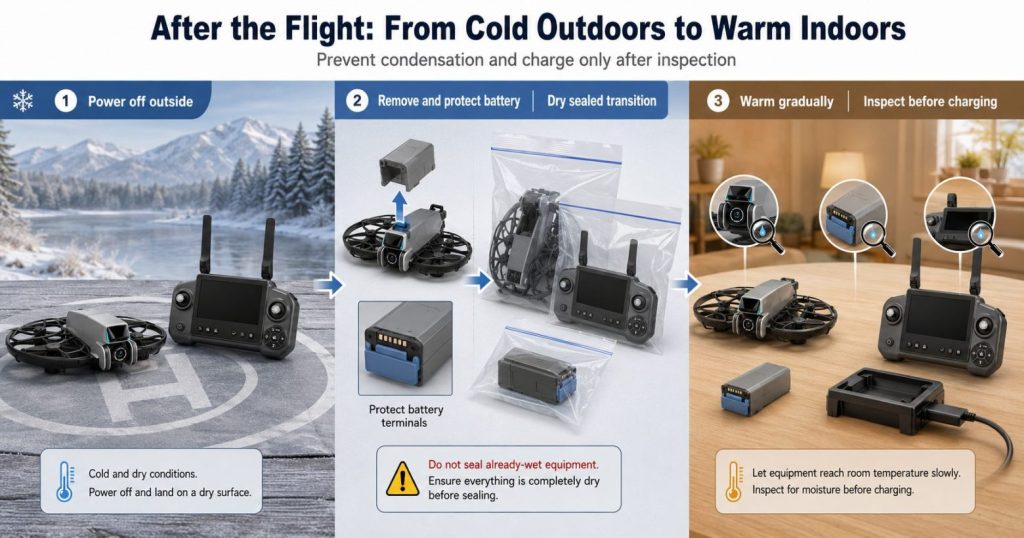
The U.S. Geological Survey describes condensation as water vapor changing into liquid water, such as moisture appearing on the outside of a cold glass. The same basic temperature difference is why a cold aircraft should be allowed to warm gradually before it is powered, charged, or sealed into long-term storage.
Use a Dry Transition Before Entering a Warm Room
- Land on a dry surface and power the drone off. Do not fold, pack, or handle wet propellers while the aircraft remains powered.
- Remove the flight battery in a dry location when the model instructions permit it. Protect the contacts and keep the pack separate from metal objects.
- Brush away loose dry snow before it melts. Do not force snow deeper into vents, motors, joints, or the battery bay.
- Place dry, powered-off equipment in a clean sealable bag before entering warm, humid air. This can reduce direct exposure to moist room air during the initial temperature transition. Do not use this method if the equipment is already wet.
- Allow the drone, controller, and battery to warm gradually. Do not use direct high heat.
- Inspect for moisture before opening compartments, reinstalling the battery, or connecting a charger.
- Wait until the equipment is dry and within the manufacturer’s charging range. A recovered battery percentage is not charging clearance.
Do Not Seal Wet Equipment Into a Storage Case
A transition bag is useful only when the aircraft is dry before it is enclosed. If the drone is already wet, sealing the moisture inside can prolong exposure. Keep the equipment powered off, isolate the battery, follow the manufacturer’s drying instructions, and seek supplier guidance if water entered the battery compartment, motor, camera, connector, or body.
Do Not Charge a Battery Merely Because Its Surface Feels Warm
The outside of a pack can warm before the cells inside reach a stable temperature. Use the model’s specified waiting and charging procedure rather than estimating by touch. Do not charge a swollen, wet, damaged, unusually hot, or fault-reporting pack.
For the underlying moisture process, see the USGS explanation of condensation and temperature change. It explains the physical process; it does not replace drone-specific service instructions.
Moisture boundary: Do not power or charge equipment that may contain condensation. When moisture entered the aircraft or battery, stop using it until the applicable manufacturer or service procedure confirms the next step.
RCDronego Models Need Verified Cold-Weather Operating Limits
The supplied RCDronego product data confirms several battery and listed flight-time specifications, but it does not confirm minimum operating temperature, minimum charging temperature, cold-soak duration, cold-weather flight time, or low-temperature warning behavior for XT606, GT6, S-X1, AE20 Max, or XT808.
| Information Status | What RCDronego Can State | What Must Remain To Be Confirmed |
|---|---|---|
| Listed endurance | XT606 and GT6 are listed at approximately 25 minutes; AE20 Max at approximately 22 minutes | Actual endurance in a defined cold-weather test |
| Battery specification | GT6 and XT808 list 7.4V 1300mAh packs in the supplied data | Permitted operating and charging temperature range |
| Positioning | GPS and supported RTH features are confirmed for the GPS line | Cold-weather voltage reserve used by automatic RTH logic |
| Controller | Screen-remote sizes are confirmed for several models | Controller and display endurance at defined temperatures |
| Cold-weather suitability | No model may be ranked from the available evidence | Supplier documentation or controlled, repeatable model-specific testing |
Battery voltage, capacity, aircraft weight, GPS, optical flow, brushless motors, or a screen remote cannot be converted into a minimum temperature rating. Buyers can compare confirmed everyday specifications in the GPS drone guide for beginners, but cold-weather approval remains a separate evidence requirement.
A useful cold-weather test record would identify the exact model and firmware, battery part number and age, starting battery temperature, air temperature, wind, route, altitude, flight mode, takeoff charge, warning timing, voltage behavior, landing reserve, and post-flight battery condition. A winter product render or an undocumented outdoor clip does not provide that evidence.
Cold-Weather GPS Drone Checklist for Beginners
Before Leaving Home
- Confirm the aircraft and battery operating range in the current manual or supplier documentation.
- Confirm the permitted charging range before connecting a cold battery.
- Fully charge the flight battery and controller only under approved conditions.
- Reject swollen, damaged, wet, corroded, leaking, or fault-reporting batteries.
- Inspect the propellers, motors, battery latch, contacts, camera, GPS body, and optical sensors.
- Pack batteries separately with protected terminals and no loose metal objects.
- Prepare a dry case or clean transition bag for the return indoors.
At the Launch Site
- Check temperature, wind, gusts, visibility, precipitation, and the return direction.
- Choose a dry clear launch and alternate landing area.
- Keep batteries protected until the rest of the setup is complete.
- Remove all frost, snow, water, and ice from the aircraft.
- Install and latch the battery immediately before power-up.
- Confirm normal startup messages, GPS status, and the recorded home point.
- Complete a short low hover and close return check.
During the Flight
- Remain closer than on a mild-weather flight.
- Watch the rate of battery decrease, not only the remaining percentage.
- Avoid a long climb, distant subject, automated route, or flight over water.
- Return before the normal low-battery warning becomes the plan.
- Land if battery, voltage, temperature, motor-power, or controller warnings appear.
- Choose the nearest safe landing area if a long home-point return becomes uncertain.
After Landing
- Power down and remove the battery in a dry safe location.
- Do not relaunch a pack that produced abnormal warnings or rapid battery loss.
- Remove loose dry snow before it melts into the aircraft.
- Use a dry controlled transition before entering warm humid air.
- Let the drone, battery, remote, and camera warm gradually.
- Inspect for condensation before powering or charging.
- Follow supplier guidance when moisture or a battery fault is found.
Beginner no-go rule: Postpone the flight when the model’s operating limit is unknown, the battery became cold-soaked, wind or moisture removes the return margin, the aircraft cannot complete a normal low hover, or you do not have a dry post-flight transition plan.
Frequently Asked Questions About Flying a Drone in Cold Weather
You can fly only when the aircraft, battery, and controller remain inside their verified operating limits. Keep the battery protected before takeoff, perform a short low-altitude check, remain close, return early, and avoid precipitation unless the model is specifically approved for it. When the model’s minimum temperature is not confirmed, do not invent one.
Cold can reduce the battery’s available power and energy while increasing voltage drop under motor load. The aircraft may use additional power for climbing, positioning, and wind correction at the same time. The displayed percentage is an estimate, so the rate of decline and any voltage or power warnings matter more than the takeoff number alone.
Keep the battery within the temperature range permitted by its manufacturer, but do not use direct high heat, hot water, fire, a radiator, or an improvised heater. Protect the pack from cold during travel and install it near the end of setup. The correct method depends on the exact battery and model instructions.
Do not charge a cold battery unless the manufacturer explicitly permits charging at that temperature. Let it warm gradually and confirm that it is dry, undamaged, and inside the battery-specific charging range. Surface warmth alone does not prove that the cells inside are ready to charge.
No. GPS and return-to-home can command a route, but they cannot restore battery power. Cold, distance, climbing, and headwind can reduce the reserve available for the return. Confirm the home point and return altitude, stay close, and begin returning before an automatic low-battery action becomes necessary.
Power the drone off, remove the battery in a dry location when permitted, remove loose dry snow, and use a dry closed case or clean transition bag before entering warm humid air. Let the equipment warm gradually, then inspect it for moisture before powering or charging. Do not seal already-wet equipment into a case.
The Bottom Line
Can you fly a drone in cold weather? Only when the specific aircraft and battery remain inside their verified limits and the pilot treats listed flight time as a starting specification—not a usable cold-weather promise. Protect the battery before takeoff, use a short close flight to check its behavior, return before the normal battery margin disappears, avoid snow and moisture unless the model is approved for them, and warm the powered-off equipment gradually before charging. When the model’s operating or charging limit is unknown, the safe answer is Supplier Confirmation Required.